
Chicago O'Hare ORD
FlightInfoApps.comTravel & Local
4.420.00 Reviews
- Version
- 26.8.23
- Installs
- 10.00K
- Age Rating
- Mature 17+
Screenshots
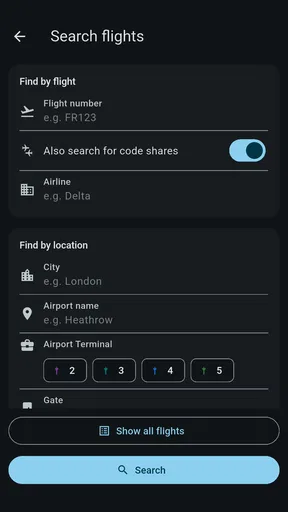
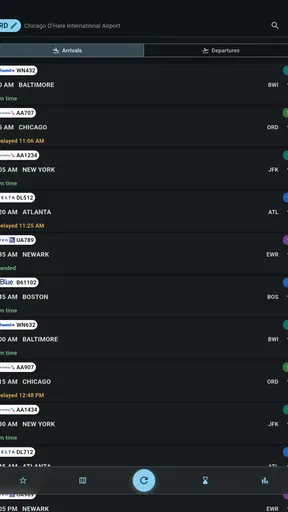
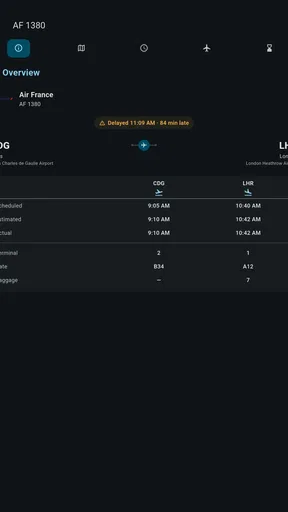
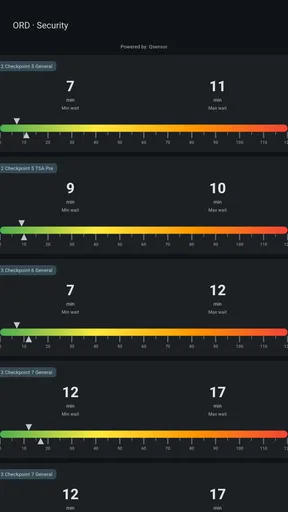
Our Review of Chicago O'Hare ORD
 Analysis by Appyee
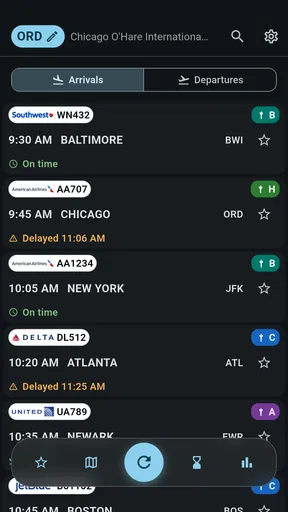
When I am heading through Chicago O’Hare, I want flight information that answers practical questions quickly: Has the gate changed? Is the departure still on time? Which terminal should I be walking toward? Chicago O'Hare ORD is built for that narrow but important travel problem, focusing on live arrivals, departures, gates, and delays for ORD rather than trying to become a complete trip-planning service.
That focus is its biggest strength. I found the app most useful as a companion for the airport itself, especially when I already knew my flight number and needed a compact way to check its current status. It is a free Travel & Local app from FlightInfoApps.com, with optional in-app purchases ranging from $3.49 to $32.99 per item. The free entry point makes it easy to try before deciding whether the extra options are worthwhile.
The app is rated 4.4 on average from around 129 ratings, and it has passed 10K+ installs. Those figures suggest a modest, focused audience rather than a huge all-purpose travel platform. That suits the product: it is not trying to replace an airline app, a map, or a booking service. It is a dedicated ORD reference that I would keep available for the moments when airport information matters more than itinerary management.
How Chicago O'Hare ORD performs during real travel moments
I find this app most useful when I treat it as a quick ORD checkpoint, not as the final authority for a travel decision. A practical habit is to check a flight before setting out, then verify important changes against airline instructions or airport displays once I arrive. That division keeps the app useful without asking it to do a job that belongs to official travel channels.
Speed expectations when every minute matters
The first thing I look for in an airport-status app is not a long feature list. I want the route from opening the app to finding my flight to feel uncomplicated. Chicago O'Hare ORD has a naturally narrow job, so it can be more direct than a general travel application filled with bookings, loyalty accounts, hotel suggestions, and destination content. If I am checking whether an arrival has landed or whether a departure is delayed, I do not need all that extra material in the way.
That does not mean every check will feel instant. Live airport information depends on current data being available, and a status app should be treated as a quick reference rather than a guarantee that every change will appear before an airline or airport system posts it. My practical advice is to use it for fast awareness, then confirm a major decision through the airline or airport’s official channel when timing, rebooking, or a missed connection is at stake.
The app’s usefulness is especially clear when I am meeting someone at O’Hare. Instead of repeatedly asking whether a flight has landed, I can check the arrival status and use the gate information as a planning clue. That helps me decide whether to leave home, wait a little longer, or adjust where I expect to meet the traveler. It is a small workflow, but it is exactly the kind of repeated check where a focused app earns its place.
For departures, speed is less about racing through menus and more about avoiding uncertainty. Before leaving for the airport, I would check the status, note the listed gate, and then check again closer to departure. At a large airport such as O’Hare, a gate detail can affect how much walking time I need. I would not use one early check as permission to cut things close, because gates and airport conditions can change after the information is viewed.
What happens during heavy-use moments
The most demanding time for an airport app is not a quiet afternoon with one simple lookup. It is the busy travel day when I am checking several flights, refreshing before leaving, looking again after security, and comparing an arrival with a connecting departure. Chicago O'Hare ORD is appealing in that situation because its purpose remains clear: it keeps attention on ORD flight movement instead of surrounding the status with unrelated travel tasks.
A useful habit is to separate monitoring from decision-making. I would use the app to watch an incoming flight, but I would not assume that a delayed arrival automatically tells me what an airline will do with a connection. A delay can change boarding plans, baggage timing, or the best route through the airport. The app can help me notice the initial change; airline staff and official instructions remain more appropriate for the next action.
Another practical use is coordinating with a family member who is arriving at O’Hare. One person can check the flight while the other handles parking, public transport, or the meeting point. That reduces the temptation to send a string of messages asking for updates. The trade-off is that both people still need a shared understanding of the terminal and meeting location. A gate listing is useful for orientation, but it is not necessarily the best place to meet someone, particularly if access is restricted.
I also see value for people who work near the airport or regularly collect passengers. A dedicated ORD app can be less distracting than opening a full airline account every time. However, frequent users should pay attention to how often they refresh. Constantly checking a live status can consume attention without producing new information, especially when a flight has not changed. I prefer checking at sensible milestones: before departure from home, after reaching the airport, and when the expected arrival window gets close.
Reliability and how I would recover from conflicting information
Reliability here has two parts. The first is whether the app presents the flight information in a readable, consistent way. The second is whether that information is current enough for the decision I am making. Chicago O'Hare ORD is useful for the first part because it concentrates on arrivals, departures, gates, and delays at one airport. That specialization makes it easier to understand what the app is intended to show.
For the second part, I would always allow for a short gap between a real-world change and what appears on a third-party status source. If the app shows one gate while an airport screen shows another, I would follow the airport’s current signage and staff guidance. If it shows a delay but the airline is calling passengers to board, I would trust the immediate official instruction rather than waiting for the app to settle the disagreement. This is not a criticism unique to this app; it is a sensible rule for any independent flight tracker.
Recovery matters too. If a lookup does not give me what I need, I want a clear backup plan rather than a false sense of certainty. I would first check that I entered the correct flight details, then look at the airline’s own status information, airport displays, or a staff member. I would also avoid making a tight connection, pickup, or transport decision from a single stale-looking screen. The app is best used as one layer of awareness, not as the only authority in a disrupted journey.
The developer, FlightInfoApps.com, has kept this product focused on Chicago O’Hare rather than presenting it as a universal airport tool. That is helpful if ORD is the airport I care about, but it also defines the app’s limits. Someone flying through several airports may prefer an airline application or a broader flight tracker that keeps an entire itinerary together. I would choose this app for a Chicago-specific need, not for managing a complicated multi-airport trip.
Device constraints, age, and everyday practicality
The current version is 26.8.23, and the app supports Android 7.0 or later. That gives it a practical place on many older Android devices, although support for an operating system does not automatically mean that every old phone will feel equally comfortable. A phone with limited storage, an aging battery, or a crowded background workload may make any live-information app less pleasant to use, particularly when I am also relying on maps, boarding passes, messaging, and mobile connectivity.
For that reason, I would install it before traveling rather than waiting until I am standing in a busy terminal. I would open it at home, make sure I understand where the relevant flight information appears, and confirm that my device is ready for travel. This simple preparation is more valuable than discovering during a delay that I have never used the app and do not know which status detail matters.
Battery use is another practical consideration. I would not leave the app open continuously throughout a long airport day. Checking it when needed is a better habit, especially if I am also navigating a large terminal or waiting for a boarding update. The app’s narrow purpose makes that approach easy: open it for a status check, record the useful detail, then return to the other tools I need.
The Mature 17+ content rating is worth noticing before installation, particularly for families choosing travel apps for a shared device. It does not change the app’s airport-focused purpose, but it may affect whether a parent is comfortable placing it on a child’s phone. I would also review the in-app purchase choices carefully before paying. Since the app is free to start, I would use the basic experience first and only consider an optional purchase if it solves a specific problem in my own travel routine.
Where it beats the usual alternatives—and where it does not
The usual alternative is the airline’s own app. That is normally the better choice when I need boarding passes, check-in, seat details, baggage information, rebooking, or direct support for a disrupted flight. An airline app understands my reservation in a way a dedicated airport tracker may not. If the trip is already complicated, keeping everything in one official itinerary can reduce confusion.
Chicago O'Hare ORD makes more sense when I want an airport-centered view. It can be useful for checking an arriving relative’s flight, comparing several movements through O’Hare, or getting a quick status reference without navigating a full airline account. It is also more relevant when I am meeting someone and do not have access to their booking details. That is a meaningful distinction, not just a difference in presentation.
A broader flight-tracking service may be better for travelers who move through multiple airports or want to follow an entire journey. The trade-off is that a wider service can feel less focused when all I need is ORD. I would choose the broader option for a multi-leg itinerary, and this app for a Chicago-specific monitoring task. Neither choice is universally better; the right one depends on whether my attention is centered on one airport or the whole trip.
Maps and airport websites also remain important companions. A map can help me understand walking routes, parking, public transport, and terminal geography, while an official airport source may be the place I turn to when I need authoritative instructions. This app fills a different gap: it gives me a convenient status-oriented view. The strongest setup is therefore complementary rather than exclusive.
Who should use it, and who should skip it
I would recommend Chicago O'Hare ORD to travelers who regularly fly through O’Hare, people collecting passengers, and anyone who wants a dedicated way to watch arrivals or departures at that airport. It is particularly suitable for a simple routine: identify the flight, check its movement, note the gate or delay, and confirm important changes through official sources.
I would be less enthusiastic for someone who rarely visits Chicago and wants one app for every airport. The narrow focus may not justify another installation if ORD is only a small part of one itinerary. I would also steer away from relying on it alone for rebooking, connection protection, or urgent travel decisions. Those situations call for the airline, airport staff, and the official information attached to the reservation.
One less obvious benefit is that it can help separate airport monitoring from airline account management. That matters when I am tracking a friend’s or relative’s flight rather than my own. One less obvious limitation is that a gate number can create false confidence: it helps me orient myself, but it does not replace checking airport screens after arrival. The most useful way to think about the app is as an early-warning and convenience tool, not a complete travel command center.
My performance verdict after using it as a focused ORD tool
Chicago O'Hare ORD succeeds because it does not need to solve every travel problem. Its value comes from giving O’Hare travelers a focused place to look for arrivals, departures, gates, and delays. In my experience, that specialization makes the app easier to fit into quick checks, pickup planning, and repeated monitoring during a busy travel day.
Its performance expectations should remain realistic. I would expect a straightforward, low-friction status check, but I would not treat any third-party flight display as more authoritative than current airline instructions or airport signage. On an older phone, I would prepare in advance, avoid leaving it open unnecessarily, and keep a backup source ready for disruptions.
The free starting price is a strong reason to test it, while the optional purchases mean I would judge any upgrade by a specific need rather than buying automatically. With a 4.4 average and a focused audience of 10K+ installs, it appears to have found a practical niche without pretending to be a universal travel solution.
My final recommendation is simple: if O’Hare is the airport you need to watch, this is a sensible app to keep nearby. If you need reservations, boarding passes, rebooking, or a complete multi-airport itinerary, use the airline’s app or a broader travel tool instead. For quick ORD awareness, its focused design is the main reason to install it; for full trip control, it should be part of a wider toolkit.
Verdict
Strengths of Chicago O'Hare ORD
- Live terminal maps help travelers find gates, shops, and services.
- Flight status updates make it easier to monitor delays and gate changes.
- Useful airport information is available in one convenient place.
- Helpful details about parking, transportation, and airport access.
- Clean, straightforward interface is easy to navigate while traveling.
Limitations of Chicago O'Hare ORD
- Some flight or gate updates may arrive later than airport announcements.
- The app is less useful when traveling through airports other than O'Hare.
- Certain features may require an active internet connection.
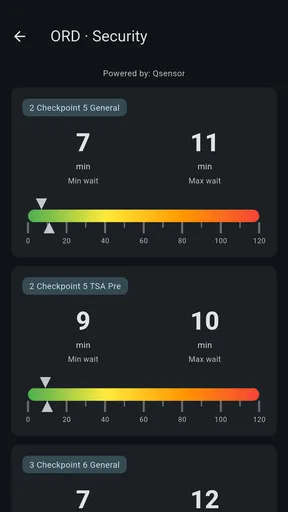
- Information about busy security lines may not always be available.
- Occasional loading issues can be frustrating during time-sensitive travel.
Other Releases by FlightInfoApps.com
View All
Newark Airport EWR
Travel & Local4.5
Similar Picks in This Category
View All
Google Maps
Google LLC3.4

Google Maps Go
Google LLC4.1

Booking.com: Hotels & Travel
Booking.com Hotels & Vacation Rentals4.8

Google Earth
Google LLC3.8

Skyscanner Flights Hotels Cars
Skyscanner Ltd4.8

trivago: Compare hotel prices
trivago N.V.4.4
Frequently Asked Questions
What is Chicago O’Hare ORD, and what can I use the app for?
Chicago O’Hare ORD is designed to help travelers manage and understand their journey through O’Hare International Airport. It can provide useful airport information such as terminal details, airline locations, flight-related updates, airport services, parking guidance, and directions. It is especially helpful when preparing for a departure, meeting someone at the airport, or navigating the airport during a connection.
Does Chicago O’Hare ORD provide live flight status and terminal information?
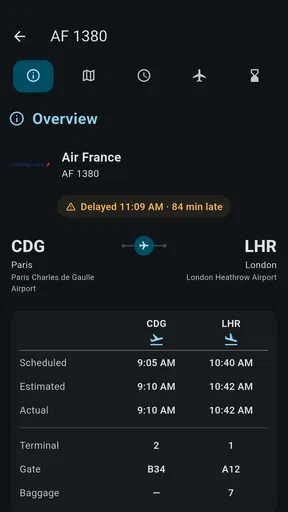
The app is intended to make flight planning easier by presenting information related to arrivals and departures at Chicago O’Hare. Depending on the available data and app version, users may be able to check scheduled times, delays, cancellations, gates, terminals, and baggage details. However, airport information can change quickly, so it is wise to confirm important updates with the airline or official airport announcements before traveling.
Can the app help me find gates, terminals, parking, and airport services?
Yes, one of the main advantages of using Chicago O’Hare ORD is having airport organization details in one place. Travelers can use it to understand the layout of O’Hare, identify terminals, locate parking areas, and search for services such as restaurants, shops, lounges, transportation connections, and passenger facilities. The exact navigation and directory features may vary depending on the current app version.
Is Chicago O’Hare ORD useful for first-time visitors and connecting passengers?
The app can be particularly useful for people visiting O’Hare for the first time or transferring between flights. Its airport information can help users become familiar with the terminal structure, estimate where they need to go, and plan time for security, walking, transportation, or baggage collection. Connecting passengers should still allow extra time, since terminal transfers, security procedures, and airline requirements may affect the journey.
Is Chicago O’Hare ORD free, and does it require an internet connection?
Availability and pricing depend on the platform and the specific version listed in the Android or iOS store. Many airport information apps can be downloaded at no cost, although some may include advertisements, optional purchases, or premium features. An internet connection may be necessary for current flight updates, maps, and refreshed airport information, so travelers should check whether selected content remains accessible offline before leaving home.
